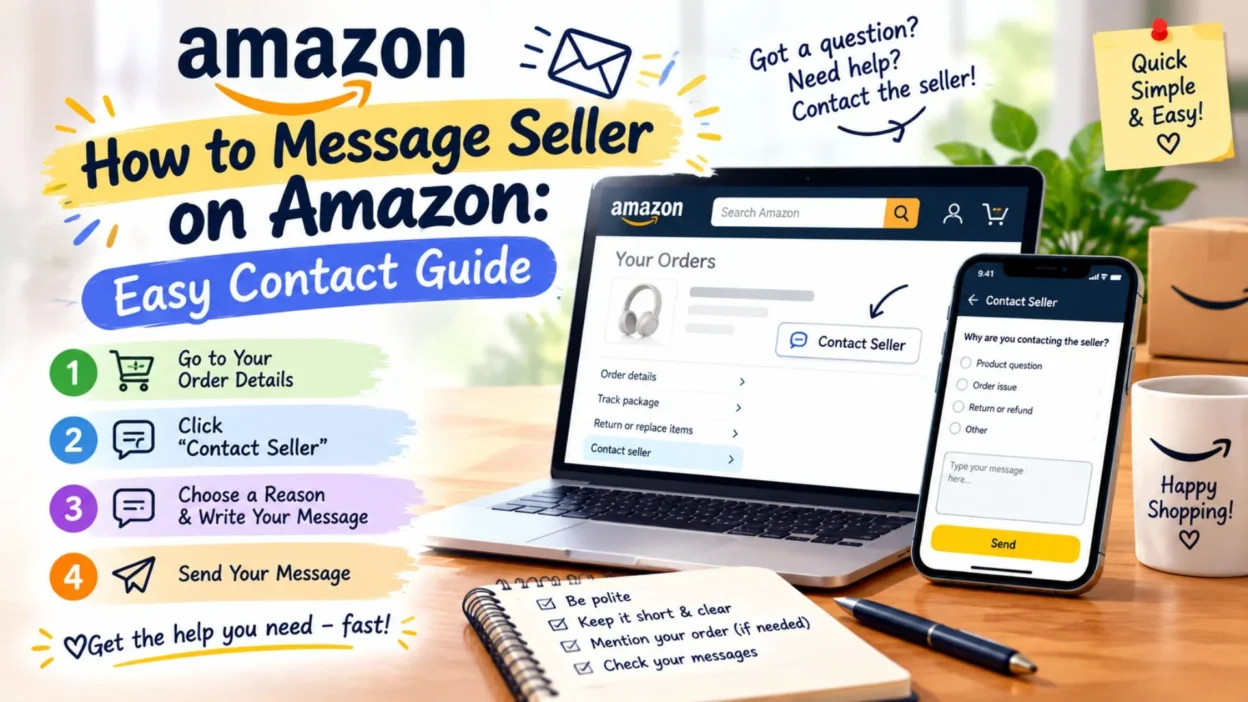
Sometimes you find the perfect product on Amazon, but one question needs an answer before you buy. You might want to ask about size, color, compatibility, shipping, product details, or an order you already placed. In that situation, knowing how to message seller on Amazon can save you time and prevent confusion.
Amazon provides ways for buyers to contact third-party Marketplace sellers before and after an order. Before buying, you can go through the product detail page and use the seller’s contact option. After ordering, Amazon directs buyers through Your Orders to the relevant support option.
The exact options can vary depending on the order and seller. Amazon may also direct you to Amazon Customer Service when it handles customer service for the item.
This guide explains the process in simple steps, along with useful examples of what you can write to a seller.
How to Message Seller on Amazon Before Buying
If you have not placed an order yet, you can contact a third-party Marketplace seller through the product listing.
Amazon’s current instructions say to select the seller’s name on the product detail page and then choose Ask a question. You can use the Seller Messaging Assistant to send your question.
- Open Amazon and find the product you are interested in.
- Go to the product detail page.
- Look for the seller information near the purchase section.
- Select the seller’s name.
- Choose Ask a question.
- Use the Seller Messaging Assistant to send your message.
- Clearly explain what you want to know.
- Wait for the seller’s response.
A seller may respond within 48 hours, according to Amazon’s current customer help guidance. Seller correspondence can be found in the Message Center under the Buyer/Seller Messages area.
What Can You Ask a Seller Before Ordering?
A pre-order message is useful when the product page does not answer an important question.
You might ask about:
- Product specifications
- Size or dimensions
- Available colors
- Compatibility
- Included accessories
- Product condition
- Expected shipping details
- Product-specific information
Keep your question direct so the seller can understand exactly what you need.
How to Message Seller on Amazon After Ordering
If you already purchased the item, Amazon provides a different route through Your Orders.
According to Amazon’s current help instructions, select the relevant third-party item from Your Orders and choose the option that best matches your question. Available options can include Problem with order, Get product support, Return items, or Ask Product Question.
- Sign in to your Amazon account.
- Open Your Orders.
- Find the order you need help with.
- Select the relevant third-party item.
- Choose the option that matches your issue.
- Follow the on-screen instructions.
- If Amazon provides an option to email the seller, use it to send your message.
- Check your Amazon messages for the seller’s response.
Depending on the order and your issue, Amazon may connect you with the seller, provide another service, or direct you to Amazon Customer Service.
Short Messages to Send an Amazon Seller
A clear message usually makes it easier for the seller to understand your question. These examples can be adapted to your situation.
- Hi, could you please confirm whether this item is available in the color shown in the listing?
- Hello, could you tell me the exact dimensions of this product before I place my order?
- Hi, I would like to know whether this product is compatible with my device. Thank you.
- Could you please confirm what accessories are included with this item?
- Hello, can you confirm whether this product is new and unopened?
- Hi, could you please provide more information about the material used for this product?
- Is this item available for shipping to my location? Thank you.
- Could you please confirm the expected delivery time for this product?
- Hi, I have a question about the product description. Could you please clarify one detail for me?
- Hello, does this item come with the warranty mentioned in the listing?
Messages to Ask About Product Details
Sometimes you simply need more information before deciding whether to buy.
- Hi, could you please confirm the exact model number of this product?
- Can you tell me whether the measurements in the listing are accurate?
- Does this product include everything shown in the product images?
- Could you please confirm the available size options?
- Is the product color exactly as shown in the listing photos?
- Does this item work with the latest version of the device mentioned in the description?
- Could you please confirm whether batteries are included?
- Is there any difference between this item and the previous model?
- Could you clarify one feature mentioned in the product description?
- Can you confirm the quantity included in this package?
Messages About an Existing Amazon Order
If you have already purchased the product, explain the issue clearly and include relevant order details when appropriate.
- Hello, I am contacting you about my recent order. Could you please provide an update?
- Hi, could you please confirm the current status of my order?
- My order has not arrived yet. Could you please check the delivery status?
- Hello, I received my order, but I have a question about the product. Could you please help?
- Hi, the item I received appears different from the listing. Could you please assist me?
- Could you please explain the next steps for resolving this issue with my order?
- Hello, I received the package, but one item appears to be missing. Could you please check?
- Hi, I need assistance with an item from my recent order. Could you please advise me?
- Could you please provide information about the return process for this item?
- Hello, I would appreciate your help with an issue concerning my recent purchase.
What If You Cannot Find the Message Seller Option?
The contact options shown on Amazon can depend on the seller, order, product, and type of issue. Amazon’s current guidance notes that some buyers may be directed to Amazon Customer Service instead of being given a direct seller email option.
If you cannot see a direct contact option:
- Check that you are signed in to the correct Amazon account.
- Open the exact product or order involved.
- Review the available support options.
- Check Your Orders if you already purchased the item.
- Look for Ask a question on the seller’s product-page profile before ordering.
- Follow the support option Amazon provides for your specific issue.
For items that are sold by a third-party seller but fulfilled by Amazon, Amazon identifies the seller and fulfillment information separately. Items that are sold and fulfilled by Amazon are shown differently on the product page.
Messages About Amazon Delivery
When an order is delayed or you need clarification about delivery, keep the message polite and specific.
- Hi, could you please check the latest delivery status of my order?
- Hello, my order has not arrived yet. Could you please provide an update?
- Could you please confirm when my package is expected to arrive?
- Hi, the tracking information has not changed recently. Could you please check the order status?
- Hello, I received a delivery update, but the package has not arrived. Could you please advise me?
- Could you please confirm whether my order has already been shipped?
- Hi, can you confirm which shipping service is being used for my order?
- Hello, I would appreciate an update regarding the shipment of my purchase.
- My order appears to be delayed. Could you please let me know if there is any new information?
- Hi, could you please check whether my package is still on its way?
Messages About a Damaged Product
If an item arrives damaged, describe the problem clearly and ask what steps you should take next.
- Hello, my order arrived with visible damage. Could you please advise me on the next steps?
- Hi, the product was damaged when I opened the package. Could you please help me resolve this?
- I received the item, but part of it appears to be damaged. Could you please assist me?
- Hello, the packaging was damaged when it arrived, and the product inside was affected. What should I do next?
- Hi, I noticed damage to the product after opening the package. Could you please let me know how to proceed?
- Could you please help me with a replacement or the appropriate return process for this damaged item?
- Hello, the item I received does not appear to be in the condition shown in the listing. Please advise.
- Hi, I would appreciate your assistance with the damaged product I received.
Messages About a Wrong Item
Receiving a different product can be frustrating. A simple message helps the seller understand the issue quickly.
- Hello, I received a different item from the one I ordered. Could you please help me resolve this?
- Hi, the product I received does not match my order. Could you please check what happened?
- I received the wrong size. Could you please advise me about the available options?
- Hello, the color I received is different from the one selected in my order. Please let me know how to proceed.
- Hi, the model I received is not the one shown on my order. Could you please assist me?
- Could you please check my order and advise me about returning the incorrect item?
- Hello, I believe I received the wrong product. I would appreciate your help in resolving this issue.
- Hi, could you please confirm whether a replacement is available for the incorrect item?
Messages About a Missing Item
If something is missing from the package, explain what you expected and what you actually received.
- Hello, one item appears to be missing from my package. Could you please check my order?
- Hi, I received my package, but the listed accessory was not included. Could you please help?
- Could you please confirm whether the missing item was shipped separately?
- Hello, my order arrived, but one product from the purchase is missing. Please advise.
- Hi, could you check whether the missing item has a separate tracking number?
- I received the package, but it does not contain everything listed in my order. Could you please assist?
- Hello, could you please confirm the contents that were supposed to be included with my order?
- Hi, I would appreciate your help locating the missing item from my purchase.
Messages About Returns
When you need to return an item, use the available Amazon return process and communicate with the seller when Amazon provides that option.
- Hello, I would like to return this item. Could you please confirm the appropriate next steps?
- Hi, could you please provide any additional information I need for the return?
- I would like to return the product because it does not meet my needs. Please advise.
- Hello, could you please confirm whether the item is eligible for return?
- Hi, I have started the return process and would appreciate any additional instructions.
- Could you please clarify the return requirements for this order?
- Hello, I would like to understand the return process before sending the item back.
- Hi, could you please confirm where I should look for the return instructions?
Messages About Refunds
If you are waiting for information about a refund, keep your message focused on the transaction.
- Hello, could you please provide an update regarding my refund?
- Hi, I returned the item and would like to know whether the refund has been processed.
- Could you please check the status of the refund associated with my order?
- Hello, I would appreciate an update about the refund for my returned item.
- Hi, could you please confirm whether my returned package has been received?
- I am checking on the status of my refund. Could you please assist me?
- Hello, could you please clarify the next step regarding my refund?
- Hi, I would appreciate any available update about my refund request.
Polite Messages to Ask an Amazon Seller a Question
A polite opening can make a simple question sound more professional and friendly.
- Hello, I hope you are doing well. I have a quick question about this product.
- Hi, could you please help me clarify one detail about the item?
- Hello, I am interested in this product and would appreciate some additional information.
- Hi, before placing my order, could you please answer one quick question?
- Hello, could you please confirm one detail about the product listing?
- Hi, I would appreciate your help with a question about this item.
- Hello, I am considering purchasing this product and wanted to confirm a few details first.
- Hi, could you please provide some clarification about the item before I order?
Messages About Product Availability
If you are interested in an item that appears unavailable, you can ask whether the seller expects more stock.
- Hi, do you know when this product may become available again?
- Hello, could you please let me know if you expect to have more stock soon?
- Is this item currently out of stock, or will more units be available later?
- Hi, could you please confirm whether you plan to restock this product?
- Hello, I am interested in purchasing this item. Do you expect it to be available again?
- Could you please let me know if another size or variation is currently available?
- Hi, will this product be restocked in the near future?
- Hello, could you please advise whether additional stock is expected?
Messages About Product Compatibility
Compatibility questions are especially useful for electronics, accessories, replacement parts, and similar products.
- Hi, could you please confirm whether this product is compatible with my device?
- Hello, will this accessory work with the model listed in my question?
- Could you please confirm the exact models that this product supports?
- Hi, I want to make sure this item fits my device before ordering. Could you please confirm?
- Hello, is this replacement part compatible with the model shown in the listing?
- Could you please confirm whether this accessory works with the latest version of the device?
- Hi, does this product require any additional adapter or accessory to work?
- Hello, could you please clarify the compatibility information shown in the listing?
Messages About Size and Fit
Clothing, shoes, furniture, cases, and accessories often require more specific size information.
- Hi, could you please confirm whether the listed measurements are accurate?
- Hello, I am unsure about the sizing. Could you please provide additional measurements?
- Could you please confirm the dimensions of this item before I order?
- Hi, does this product follow standard sizing?
- Hello, could you please tell me which size would match the measurements shown in the listing?
- Can you confirm the length and width of this product?
- Hi, could you please provide the exact measurements for this item?
- Hello, I want to make sure the product fits properly. Could you please clarify the sizing?
How to Write a Good Amazon Seller Message
A useful seller message does not need to be complicated. The goal is to make your question easy to understand and answer.
- Start with a polite greeting.
- Explain why you are contacting the seller.
- Ask one clear question whenever possible.
- Include relevant order information when discussing an existing purchase.
- Avoid unnecessary personal information.
- Keep your wording respectful and straightforward.
- Describe product problems accurately rather than using emotional language.
- If you need help with an order, explain what happened and what assistance you need.
- Check your message before sending it to make sure the question is clear.
- Keep communication within Amazon’s available messaging and support system.
What Information Should You Include?
The right details can help the seller understand your request without making the message unnecessarily long.
- The product name or item involved
- The specific question or problem
- Relevant order information when appropriate
- The size, color, model, or variation involved
- A brief description of what happened
- The assistance you are requesting
Avoid sharing unnecessary sensitive information in a seller message. Include only details that are relevant to resolving your question.
Best Messages for Sharing or Captions
Sometimes you may want a very short message that is easy to copy, save, or share while checking a product with a seller. These examples keep the question clear without adding unnecessary details.
- Can you please confirm if this item is currently available?
- Is this product exactly as shown in the listing?
- Could you please confirm the expected delivery time?
- Does this item come with everything shown in the description?
- Can you confirm the product size before I place my order?
- Is this item compatible with my current device?
- Could you please confirm whether this color is available?
- Can you tell me if this product includes a warranty?
Copy-Paste Ready Amazon Seller Messages
When you already know what you want to ask, a complete message can make the conversation much easier. Include the important detail, keep your tone polite, and ask one clear question at a time.
- Hi, I’m interested in this product. Could you please confirm whether it is currently in stock? Thank you.
- Hello, could you please confirm the exact dimensions of this item before I place my order?
- Hi, I have a question about the product description. Does this item include all the accessories shown in the listing?
- Hello, can you please confirm whether this product will work with my device? The model is [model name].
- Hi, I received my order, but the item appears to be different from what I ordered. Could you please help me resolve this?
- Hello, my order arrived damaged. Could you please advise me on the next step?
- Hi, I received the package, but one item is missing. Could you please check what may have happened?
- Hello, could you please provide an update about my order? I would like to know whether it has already been shipped.
- Hi, I’m considering purchasing this item. Could you please confirm whether the size listed is accurate?
- Hello, I would like to ask about the return process for this product. Could you please explain what I should do?
- Hi, could you please confirm whether this product is the same version shown in the current listing?
- Hello, I have a question about my recent order. Could you please check the order details and let me know what I should do next?
Tips for Getting a Clear Seller Response
A seller is more likely to understand your request when your message is specific and easy to read. You do not need to write a long explanation.
- Start with a polite greeting.
- Ask one main question clearly.
- Mention the product, order, or issue when necessary.
- Include the model number if you are asking about compatibility.
- Avoid sending several unrelated questions in one message.
- Keep your wording respectful and straightforward.
- If you have already placed an order, include relevant order information through Amazon’s available order-support options rather than posting private details publicly.
- Give the seller reasonable time to respond before sending repeated messages.
A simple message such as “Could you please confirm whether this product is compatible with my model?” is usually easier to answer than a long paragraph containing several different questions.
When Amazon Customer Service May Be More Helpful
Seller messaging is useful for product-specific questions and some order-related concerns, but not every issue needs to be handled directly by the seller. Amazon provides separate customer-service and order-support options for situations that may require help from Amazon itself.
If you cannot find a seller-contact option, your issue involves an Amazon service, or the available order-support choices direct you elsewhere, follow the support option shown in your Amazon account.
The exact options can vary depending on the order, seller, product, and account. For that reason, it is better to follow the current options displayed on Amazon rather than relying on an old menu path.
Common Mistakes to Avoid When Messaging a Seller
A good seller message should be short, polite, and focused. Avoid adding unnecessary information that could make your question difficult to understand.
- Do not send the same message repeatedly within a short period.
- Do not use unclear phrases such as “What happened?” without explaining the issue.
- Do not combine multiple unrelated problems into one confusing message.
- Do not share sensitive personal information unnecessarily.
- Do not assume the seller knows which product or order you mean.
- Do not use an aggressive tone when asking for help.
- Do not make demands when a simple request can explain the problem.
Instead of writing “Why is my order late? Fix it now,” you could write, “Hello, could you please check the current status of my order and let me know if there is an updated delivery estimate?”
FAQ About Messaging an Amazon Seller
How do I message seller on Amazon before buying?
Open the product listing and look for the seller information or seller name. Depending on the listing and current Amazon interface, you may see an option to contact the seller or ask a question. You can then send a short message about the product.
How do I contact a seller after placing an order?
Go to your Amazon orders and open the relevant order. Look for the available support or seller-contact option. The exact choices can vary depending on the order and seller.
Why can’t I find the option to message the seller?
The contact option may not appear in the same place for every product or order. Some issues may also be handled through Amazon’s customer-service or order-support system instead.
What should I include in a seller message?
Include the specific product or order you are asking about, explain the issue briefly, and ask one clear question. If compatibility is involved, provide the relevant model information.
How long should I wait for a seller response?
Give the seller reasonable time to respond before sending another message. If the issue is urgent or Amazon provides another support option for your situation, follow the support instructions shown in your account.
Final Thoughts on How to Message Seller on Amazon
Knowing how to message seller on Amazon can make buying online much less confusing. Whether you want to check product details, confirm compatibility, ask about availability, or explain an issue with an order, a clear message can save time and prevent misunderstandings.
The easiest approach is to keep your message polite, specific, and short. Mention the product or order when needed, explain exactly what you want to know, and avoid adding unrelated information. A simple question is often enough to start a useful conversation.
You can also save the copy-paste examples in this guide for future purchases. They can help when you are unsure what to write or want to contact a seller quickly. Most importantly, use the contact and support options currently available in your Amazon account because the exact process can change depending on the product and order.

Noah Anderson is a content writer at MessagesfyHub, specializing in heartfelt messages, wishes, quotes, and greetings for every occasion. He is passionate about creating meaningful, easy-to-share content that helps people express their emotions with the right words.