Going away from work for a few hours, a day, or even several weeks? An automatic reply can let people know that you are unavailable without leaving them wondering when you will respond. A well-written out of office message Gmail users can set up should be clear, polite, and useful. It should quickly explain that you are away, mention when you expect to return, and provide another contact when an urgent response is needed.
The good news is that your out-of-office reply does not need to sound stiff or overly formal. You can keep it professional while still making it feel natural and friendly. Whether you need a vacation response, a short workplace reply, a sick-day message, or a message for personal leave, the right wording can save time and set clear expectations. Below, you will find practical Gmail auto-reply examples that you can copy, customize, and use whenever you are unavailable.
Top Out of Office Message Gmail Examples 📧
These professional examples work well for workplace emails, clients, customers, and general business communication.
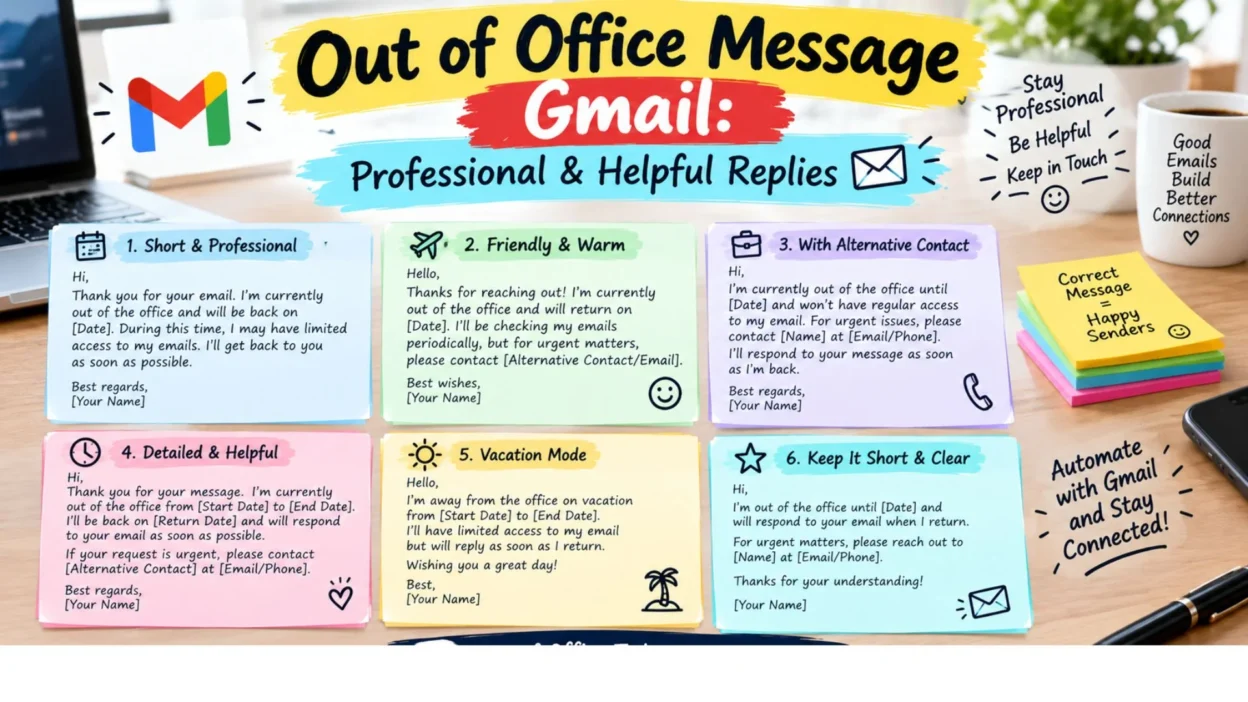
- Thank you for your email. I’m currently out of the office and will return on [date]. I’ll respond as soon as possible after I return.
- Thank you for reaching out. I’m away from the office until [date] and may have limited access to email. I’ll get back to you when I’m available.
- Thanks for your message. I’m currently out of the office and expect to return on [date]. For urgent matters, please contact [name] at [email].
- I appreciate your email. I’m away from work at the moment and will respond to your message as soon as I can after returning.
- Thank you for contacting me. I’m currently unavailable and will be back in the office on [date]. I appreciate your patience.
- I’m currently out of the office with limited access to email. I’ll review your message when I return on [date]. Thank you for understanding.
- Thank you for your message. I’m away from the office and will have limited availability until [date]. I’ll respond as soon as possible once I’m back.
- I’m currently unavailable and will return to the office on [date]. If your matter is urgent, please contact [name] at [email].
- Thanks for getting in touch. I’m out of the office until [date] and will respond to your email after I return.
- Thank you for your email. I’m currently away and unable to respond immediately. I’ll be happy to get back to you when I return.
- I’m away from the office and checking email only occasionally. I’ll respond to your message as soon as I’m able.
- Thank you for reaching out. I’m currently out of the office and will return on [date]. Your message is important to me, and I’ll respond shortly after my return.
- I’m currently away from work and may not be able to respond to emails promptly. I’ll be back on [date] and will follow up then.
- Thanks for your email. I’m unavailable until [date]. For immediate assistance, please reach out to [name] at [email].
- I appreciate you contacting me. I’m currently out of the office and will respond when I return. Thank you for your patience and understanding.
Short Out of Office Message Gmail Replies ✉️
A short automatic reply is useful when you want to communicate the essential information without writing a long message.
- I’m currently out of the office and will return on [date]. Thank you for your email.
- Thanks for your message. I’m away until [date] and will respond when I return.
- I’m currently unavailable and will reply to your email after [date].
- Thank you for contacting me. I’m out of the office until [date].
- I’m away from work at the moment and will respond as soon as I’m back.
- Thanks for reaching out. I’ll be back on [date] and will reply shortly afterward.
- I’m currently out of the office with limited email access. I’ll respond when I return.
- Away from the office until [date]. Thanks for your patience!
- I’m unavailable right now but will get back to you after [date].
- Thank you for your message. I’ll respond as soon as I’m available.
- I’m out of the office today and will respond when I return.
- Thanks for your email. I’m away and will be back on [date].
- Currently out of the office. I’ll respond after I return on [date].
- I’m away from my desk and may be slow to respond. Thanks for understanding.
- Thank you for your email. I’ll be back soon and will respond as quickly as possible.
- I’m currently unavailable. For urgent matters, please contact [name] at [email].
- Out of the office until [date]. I’ll get back to you when I return.
- I’m away today and will respond to your message when I’m back.
Professional Out of Office Message Gmail Templates 💼
These templates are suitable for clients, managers, coworkers, business partners, and other professional contacts.
- Thank you for your email. I am currently out of the office from [start date] through [end date] and will have limited access to email. I will respond as soon as possible upon my return.
- Thank you for contacting me. I am currently away from the office and will return on [date]. If you require immediate assistance, please contact [name] at [email].
- I appreciate your message. I am out of the office until [date] and may not be able to respond during this time. I will review your email and follow up after I return.
- Thank you for reaching out. I am currently unavailable and expect to return on [date]. For urgent requests, please contact [name] at [email].
- I’m currently away from the office and have limited access to email. I’ll return on [date] and will respond to your message as soon as possible.
- Thank you for your email. I am away from the office through [date]. For assistance while I am unavailable, please contact [name] at [email]. Otherwise, I’ll respond when I return.
- Thanks for your message. I’m currently out of the office and will have limited email access. I expect to return on [date] and will respond shortly afterward.
- I’m currently unavailable due to scheduled time away from the office. I’ll return on [date] and will address your message as soon as possible.
- Thank you for contacting me. I’m away from the office until [date]. If your request cannot wait, please contact [name]. Otherwise, I’ll respond when I’m back.
- I appreciate your email and your patience. I’m currently out of the office and will return on [date]. I look forward to responding to your message then.
Vacation Out of Office Message Gmail Examples 🌴
Vacation auto-replies can be professional while still showing a little personality. These examples are suitable for planned holidays and time away.
- Thank you for your email! I’m currently enjoying some time away from the office and will return on [date]. I’ll respond once I’m back.
- I’m currently out of the office on vacation and will have limited access to email. I’ll be back on [date] and will respond as soon as possible.
- Thanks for reaching out! I’m away on vacation until [date]. I’ll catch up on your message when I return.
- I’m taking some well-deserved time away from work and will return on [date]. Thank you for your patience while I’m away.
- Thank you for your message. I’m currently enjoying vacation time and will return to the office on [date]. I’ll get back to you shortly after my return.
- I’m away from the office for a vacation and won’t be checking email regularly. I’ll respond when I’m back on [date].
- Thanks for your email! I’m away until [date] and may not have regular access to my inbox. I’ll follow up once I return.
- I’m currently out enjoying some time off and will be back on [date]. Thanks for your understanding!
- Thank you for contacting me. I’m taking a short break from work and will respond to your email after I return on [date].
- I’m away on vacation and will be back in the office on [date]. For urgent matters, please contact [name] at [email].
Out of Office Message Gmail for Sick Leave 🤒
If you are away because you are unwell, a simple and professional message is usually best. You do not need to share personal medical details.
- Thank you for your email. I’m currently out of the office due to illness and expect to return on [date]. I’ll respond when I’m able.
- I’m currently away from work and recovering. I may have limited access to email and will respond when I return.
- Thank you for reaching out. I’m currently unavailable and expect to be back on [date]. I appreciate your patience.
- I’m away from the office today and may not be able to respond promptly. I’ll follow up as soon as I’m back.
- Thanks for your message. I’m currently taking time away from work and will respond when I’m available again.
- I’m currently unavailable and have limited access to email. I’ll review your message once I return to work.
- Thank you for your understanding. I’m away from the office and will respond as soon as I’m able.
- I’m currently out of the office and expect to return on [date]. For urgent matters, please contact [name] at [email].
- Thanks for your email. I’m taking some time away and will get back to you when I return.
- I’m currently unavailable and unable to respond to emails as quickly as usual. I’ll follow up as soon as possible.
Out of Office Message Gmail for Personal Leave 🌿
These replies are useful when you are taking personal time and want to keep your automatic response polite without sharing private details.
- Thank you for your email. I’m currently away from the office for personal reasons and will return on [date]. I’ll respond as soon as possible after my return.
- I’m currently taking some personal time away from work and will have limited access to email. I’ll be back on [date] and will follow up then.
- Thanks for reaching out. I’m away from the office until [date] and may not be checking email regularly. I appreciate your patience.
- I’m currently unavailable and will return to the office on [date]. I’ll review your message as soon as I’m back.
- Thank you for your understanding. I’m taking some time away from work and will respond to your email when I return.
- I’m currently out of the office and unavailable until [date]. For urgent matters, please contact [name] at [email].
- Thank you for your message. I’m away from work at the moment and expect to return on [date]. I’ll get back to you shortly after that.
- I’m taking a short break from work and may have limited access to my inbox. I’ll respond when I’m available again.
- Thanks for your email. I’m currently away and will return on [date]. I appreciate your patience while I’m unavailable.
- I’m currently out of the office for personal time and will respond to your message after I return.
Friendly Out of Office Message Gmail Ideas 😊
If your workplace allows a relaxed tone, these replies can sound more natural while still giving people the information they need.
- Hi! Thanks for your email. I’m currently away from the office and will be back on [date]. I’ll get back to you then!
- Thanks for reaching out! I’m taking some time away from work and will respond when I’m back.
- Hello! I’m currently out of the office and enjoying some time away from my inbox. I’ll return on [date] and catch up with your message then.
- Thanks for your message! I’m away until [date] and may be slow to respond. I’ll get back to you as soon as I can.
- Hi there! I’m currently away from work and will be back on [date]. Thanks for your patience!
- Thanks for stopping by my inbox! I’m currently out of the office but will respond once I’m back.
- I’m away from my desk for a little while. I’ll return on [date] and get back to you as soon as possible.
- Thanks for your email! I’m taking a short break and will catch up with messages when I return.
- Hello! I’m currently unavailable, but your message has arrived safely. I’ll respond after I’m back on [date].
- Thanks for getting in touch! I’m away right now, but I’ll be back soon and ready to catch up on emails.
Out of Office Message Gmail for Holidays 🎄
Holiday auto-replies can be warm and cheerful while remaining appropriate for professional contacts.
- Thank you for your email! I’m currently away for the holiday and will return on [date]. Wishing you a wonderful holiday season!
- I’m out of the office for the holidays and will return on [date]. I’ll respond to your message once I’m back. Happy holidays!
- Thanks for reaching out. I’m taking some time off for the holiday and will have limited access to email until [date].
- I’m currently enjoying some holiday time away from work. I’ll return on [date] and will respond as soon as possible.
- Thank you for your message. I’m away for the holidays and will be back in the office on [date]. Wishing you a happy and peaceful holiday!
- I’m taking a holiday break and will have limited access to my inbox. I’ll catch up on emails when I return.
- Thanks for your email! I’m away celebrating the holiday and will respond after I return on [date]. Enjoy the season!
- I’m currently out of the office for the holidays. I’ll be back on [date] and will respond to your message then.
- Wishing you a wonderful holiday! I’m currently away from the office and will return on [date].
- Thank you for contacting me. I’m away for the holiday break and will respond as soon as I’m back.
Out of Office Message Gmail for Business Trips ✈️
These messages are useful when you are traveling for work and may have limited time or email access.
- Thank you for your email. I’m currently traveling for business and may have limited access to email. I’ll respond as soon as possible.
- I’m currently away from the office on a business trip and expect to return on [date]. I’ll follow up once I’m back.
- Thanks for reaching out. I’m traveling for work until [date] and may be slower than usual to respond.
- I’m currently attending meetings and business events away from the office. I’ll return on [date] and respond as soon as I can.
- Thank you for your message. I’m traveling for work and may have limited availability. For urgent matters, please contact [name] at [email].
- I’m currently out of the office on business travel and will have limited access to my inbox. I’ll respond when I’m available.
- Thanks for your email. I’m away on a business trip and will return on [date]. I appreciate your patience.
- I’m currently traveling for work and may not be able to respond immediately. I’ll get back to you after I return.
- Thank you for contacting me. I’m away on business until [date]. For urgent assistance, please reach out to [name].
- I’m currently out of the office for a work trip. I’ll review your email and respond as soon as my schedule allows.
Out of Office Message Gmail With an Alternative Contact 📞
Adding another contact is helpful when someone may need assistance before you return.
- Thank you for your email. I’m currently out of the office until [date]. For urgent matters, please contact [name] at [email].
- I’m away from the office and will return on [date]. If you need immediate assistance, please reach out to [name] at [email].
- Thanks for your message. I’m currently unavailable. For urgent requests, please contact [name] at [email], and I’ll respond to other messages when I return.
- I’m currently out of the office with limited email access. For immediate assistance, please contact [name] at [email].
- Thank you for reaching out. I’ll be away until [date]. If your request cannot wait, [name] can assist you at [email].
- I’m currently unavailable and expect to return on [date]. For urgent business matters, please contact [name] at [email].
- Thanks for your email. I’m away from the office until [date]. Please contact [name] at [email] if you need assistance before then.
- I’m currently out of the office. For immediate support, please contact [name] at [email]. Otherwise, I’ll respond after I return.
- Thank you for your patience. I’m away until [date]. [Name] is available at [email] for urgent matters while I’m away.
- I’m currently unavailable due to scheduled time away. For assistance during this period, please contact [name] at [email].
One-Line Out of Office Message Gmail Ideas ✉️
These quick replies are ideal when you want your Gmail automatic response to be extremely simple.
- I’m currently out of the office and will return on [date].
- Away until [date]; I’ll respond when I return.
- I’m currently unavailable and will reply after [date].
- Out of the office with limited email access until [date].
- I’m away today and will respond when I’m back.
- Currently out of the office—thank you for your patience.
- I’m away from work and will respond as soon as I return.
- Thanks for your email; I’ll get back to you on my return.
- Out of office until [date]. For urgent matters, contact [name].
- I’m currently unavailable but will respond as soon as possible.
- Away from my inbox until [date]. Thanks for understanding.
- I’m taking some time away and will reply when I’m back.
- Currently unavailable; I’ll follow up after [date].
- I’m out of the office today and will respond tomorrow.
- Thanks for reaching out—I’ll reply when I’m available again.
Best Out of Office Message Gmail for Different Situations 💼
The right automatic reply depends on why you are away. These options make it easier to choose a message that fits your situation naturally.
- For a day off: Thank you for your email. I’m out of the office today and will respond when I return tomorrow.
- For a weekend: Thanks for your message. I’m currently away for the weekend and will respond when I’m back on Monday.
- For a long vacation: I’m currently out of the office on vacation and will return on [date]. I’ll respond to your email as soon as possible after I return.
- For a public holiday: Thank you for your email. I’m away from the office for the holiday and will return on [date]. I’ll respond when I’m back.
- For an appointment: I’m currently away from my desk and may have limited access to email. I’ll respond as soon as I’m available.
- For personal time: Thank you for reaching out. I’m currently away from the office and will return on [date]. I’ll follow up once I’m back.
- For limited availability: I’m currently away from the office but checking email periodically. My response may take longer than usual.
- For no email access: Thank you for your message. I’m currently out of the office without access to email and will respond after [date].
- For an urgent request: I’m currently unavailable. For urgent matters, please contact [name] at [email], and I’ll respond to other messages when I return.
- For an extended absence: I’m currently away from the office until [date]. During this time, please contact [name] at [email] for assistance.
Funny Out of Office Message Gmail Ideas 😄
A little humor can work well in casual workplaces, especially when you know the people contacting you.
- I’m currently out of the office and giving my inbox a little vacation too. I’ll be back on [date].
- I’ve temporarily escaped my inbox and will return on [date]. Thanks for your patience!
- I’m away from my desk, but your email will be waiting patiently when I return.
- I’m currently out of the office and pretending I don’t know what an inbox is. I’ll be back on [date].
- I’m taking a short break from emails. Don’t worry—your message and I will reconnect when I return.
- My inbox and I are taking some time apart. We’ll reunite on [date].
- I’m currently away from work and enjoying some screen-free time. I’ll catch up when I’m back.
- I’m out of the office, so my inbox is currently running without adult supervision. I’ll return on [date].
- I’m away until [date]. Until then, please give my inbox a little patience.
- Thanks for your email! I’m currently unavailable, but future me will be happy to deal with it when I return. 😄
How to Write an Effective Out of Office Message Gmail Reply ✍️
A useful automatic reply should answer the basic questions a sender may have without making the message unnecessarily long.
- Clearly state that you are away: Let the sender know immediately that you are currently unavailable.
- Include your return date: A specific date helps people understand when they can expect a response.
- Mention limited access when necessary: If you might check email occasionally, let people know that replies may be delayed.
- Add an alternative contact: For important work, provide another person’s name and email address when appropriate.
- Keep private details private: You do not need to explain exactly why you are away unless there is a professional reason to do so.
- Set realistic expectations: Avoid promising an immediate reply if you know you will have a busy inbox when you return.
- Keep the tone appropriate: A client-facing response may need to sound more formal than a message for close coworkers.
What to Include in Your Gmail Auto Reply 📧
A simple structure can help you create a professional automatic response in just a few lines.
- A friendly greeting or thank-you
- Your current availability
- Your return date
- Expected response time
- An alternative contact for urgent matters
- A polite closing
A useful example could be:
- Thank you for your email. I’m currently out of the office and will return on [date]. I’ll respond as soon as possible after I return. For urgent matters, please contact [name] at [email]. Thank you for your patience.
FAQ About Out of Office Message Gmail
What is a good out of office message for Gmail?
A good Gmail out-of-office reply should clearly say that you are unavailable, provide your expected return date, and explain when the sender can expect a response.
Should I include a return date in my Gmail out of office message?
Yes. Including a return date is helpful because it gives people a clear expectation about when you are likely to respond.
Should I add another contact to my out of office reply?
If someone else can handle urgent requests while you are away, adding their name and email address can make your automatic reply more useful.
Can an out of office message be casual?
Yes. A casual reply can work well for friends, coworkers, or relaxed workplaces. For clients and formal business communication, a professional tone is usually safer.
How long should a Gmail out of office message be?
Keep it short and useful. A few clear sentences are usually enough to explain your availability, return date, and alternative contact.
Conclusion
A good out of office message Gmail reply does more than tell people that you are away. It gives them useful information, sets realistic expectations, and helps prevent unnecessary follow-up emails while you are unavailable. Whether you are taking a vacation, dealing with personal time, traveling for work, or simply enjoying a day away from your desk, the right wording can keep communication smooth.
Choose a professional template when writing to clients or business contacts, or use a friendlier version when communicating with coworkers. If urgent requests may come in, adding an alternative contact can make your automatic reply even more helpful.
The best message is not necessarily the longest one. Keep it clear, polite, and relevant to your situation. Save your favorite template, customize the dates and contact details, and you will have a ready-to-use response whenever you need time away from your inbox.

Noah Anderson is a content writer at MessagesfyHub, specializing in heartfelt messages, wishes, quotes, and greetings for every occasion. He is passionate about creating meaningful, easy-to-share content that helps people express their emotions with the right words.