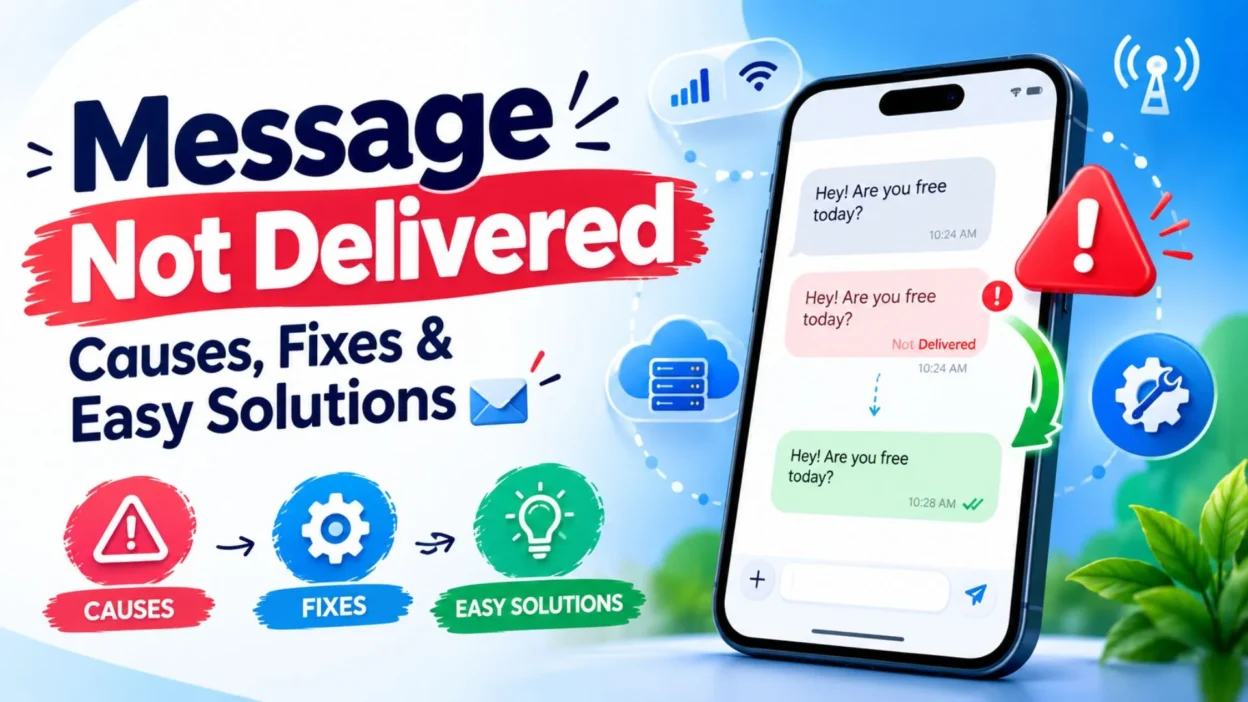
Sometimes you send a message expecting a quick reply, but instead, you see “message not delivered.” It can be confusing, especially when you are not sure whether the problem is your phone, the recipient’s device, the internet connection, or the messaging app.
The good news is that a failed message does not always mean something serious. A weak connection, disabled messaging service, incorrect number, blocked contact, app issue, or temporary network problem can all prevent a message from reaching its destination.
In this guide, you’ll learn the most common reasons a message not delivered notification appears and the simple steps you can try to get your messages working again. Whether you are using regular texting, iMessage, or another messaging service, these practical tips can help you identify the problem without unnecessary stress.
Top Reasons a Message Is Not Delivered 📱
A message can fail for several different reasons. Understanding the possible cause makes troubleshooting much easier.
- Weak or missing internet connection
- Poor cellular network coverage
- The recipient’s phone is switched off
- Airplane Mode is enabled
- The recipient has no network service
- Your messaging app has a temporary problem
- Your phone needs a restart
- The recipient’s number is incorrect
- Your messaging service is temporarily unavailable
- SMS or MMS settings are incorrect
- Your SIM card has a network issue
- The recipient may have blocked your number
- The messaging app needs an update
- Your phone has insufficient network access
- A temporary carrier outage is affecting messages
Message Not Delivered on iPhone 🍎
If you see a message not delivered notification on an iPhone, the cause may depend on whether you are using iMessage or standard SMS.
A blue message usually indicates iMessage, while a green message is generally sent through SMS or MMS.
- Check whether your iPhone has a stable internet connection.
- Try switching between Wi-Fi and mobile data.
- Make sure iMessage is enabled in your Messages settings.
- Restart your iPhone and try sending the message again.
- Check that the recipient’s phone number or Apple account is correct.
- If iMessage is unavailable, you may see an option to send the message as SMS.
- Make sure your cellular service is active.
- Check whether your carrier is experiencing an outage.
- Update iOS if an available software update may resolve the issue.
Message Not Delivered on Android 🤖
Android messaging problems can also happen because of network, SIM, app, or configuration issues.
- Check your mobile signal before sending another message.
- Turn mobile data off and on if your messaging service requires data.
- Restart your Android phone.
- Check that the correct SIM card is active.
- Confirm that the recipient’s number is entered correctly.
- Clear temporary issues by closing and reopening your Messages app.
- Install available updates for your messaging app.
- Check your SMS or MMS settings if picture messages are failing.
- Make sure your mobile plan supports the type of message you are sending.
Short Message Not Delivered Fixes ⚡
If you need a quick solution, start with these simple checks before changing advanced settings.
- Turn Airplane Mode on for a few seconds, then turn it off.
- Restart your phone.
- Check your signal bars.
- Switch between Wi-Fi and mobile data.
- Send a test message to another contact.
- Verify the recipient’s phone number.
- Reopen your messaging app.
- Check for app updates.
- Make sure your SIM is working properly.
- Try sending the message again after a few minutes.
Best Ways to Fix a Message Not Delivered 📩
When a message repeatedly fails, work through the basic troubleshooting steps one at a time.
Check Your Internet Connection
Some messaging services rely on an internet connection. If your Wi-Fi is unstable or mobile data is unavailable, the message may remain unsent.
Try opening a website or another online app. If nothing loads, your connection may be the real problem.
Check Your Cellular Signal
Regular SMS messages usually depend on your cellular network. If your phone shows little or no signal, your message may not go through.
Move to an area with better reception and try again.
Restart Your Phone
A simple restart can solve temporary network and messaging problems.
Turn your phone off, wait a few seconds, and turn it back on. Then open your messaging app and try sending the message again.
Verify the Recipient’s Number
A small mistake in a phone number can prevent delivery.
Check the number carefully, especially if you recently added the contact or are sending a message internationally.
Check Airplane Mode
Airplane Mode disables most wireless communication.
If it is accidentally enabled, your phone may not be able to send messages. Turn it off and wait for your network connection to return.
Why Does My Message Say Not Delivered? 🤔
A message not delivered notification generally means the messaging service could not successfully send or complete delivery of your message.
However, the exact meaning depends on the app and device you are using.
For example, the problem could be caused by your connection, the recipient’s device, messaging settings, or a temporary service issue.
It is also important not to immediately assume that someone has blocked you. Blocking is only one possible reason, and many ordinary technical problems can produce similar results.
Can a Blocked Number Cause a Message Not Delivered? 🚫
Yes, blocking can affect message delivery, depending on the messaging platform.
However, a failed message alone is not enough to confirm that someone has blocked you.
Network problems, inactive phones, incorrect settings, and service interruptions can create similar symptoms.
If messages to other people are working normally but you consistently cannot communicate with one particular contact, you can investigate other possible reasons. Still, avoid treating a delivery failure as definite proof of blocking.
Short Message Not Delivered Fixes 🔧
If you have already checked your signal and the message still will not send, try these additional quick fixes. They can help with temporary problems that are easy to overlook.
- Turn your phone’s mobile data off and back on.
- Disconnect and reconnect to Wi-Fi.
- Restart the messaging app completely.
- Check whether your phone has enough storage space.
- Remove and reinsert your SIM card if your device allows it.
- Check your carrier’s messaging service.
- Try sending a simple text without photos or links.
- Send a test message to a different contact.
- Update your phone’s operating system.
- Check whether the recipient can receive messages normally.
Message Not Delivered but Internet Is Working 🌐
Having an active internet connection does not always mean that every messaging service is working correctly.
Your browser may work perfectly while a particular messaging app is experiencing a temporary problem. The recipient’s device or account can also affect delivery.
- Close the messaging app and reopen it.
- Check whether other messages are being delivered.
- Switch from Wi-Fi to mobile data.
- Try sending the message again after a short wait.
- Check whether the messaging service has an outage.
- Update the app if a newer version is available.
- Restart your phone before trying again.
If other online services work but only one messaging app is failing, the problem may be related to that app rather than your internet connection.
Message Not Delivered to One Person 👤
Sometimes messages fail only when you contact one specific person. This can make the situation confusing.
First, check whether your messages to other contacts are working. If they are, the issue may be specific to that contact or their device.
- Confirm that you have the correct phone number.
- Check whether the person recently changed numbers.
- Make sure the contact information is saved correctly.
- Consider whether their phone is turned off.
- Check whether they may currently have no cellular service.
- Try a different communication method if the issue continues.
- Avoid assuming that the person has blocked you based only on one failed message.
Message Not Delivered on Wi-Fi 📶
Wi-Fi can sometimes create problems even when your phone shows that it is connected.
A connection may be weak, overloaded, or unable to reach the service your messaging app needs.
- Turn Wi-Fi off and use mobile data.
- Restart your Wi-Fi router if you control the connection.
- Forget the Wi-Fi network and reconnect.
- Move closer to the router.
- Test another website or app to confirm the connection works.
- Try sending the message after switching networks.
If the message sends successfully using mobile data, your Wi-Fi connection may be responsible for the problem.
Message Not Delivered on Mobile Data 📡
Mobile data problems can also stop internet-based messages from being sent.
Even when you have cellular signal, your mobile data connection may not be functioning correctly.
- Turn mobile data off and back on.
- Check whether your data plan is active.
- Confirm that your phone has a usable signal.
- Restart your device.
- Try another location with better reception.
- Check whether other apps can access the internet.
- Contact your carrier if mobile data continues to fail.
When a Message Says Not Delivered but You Can Receive Messages 📥
This situation can be especially confusing. You may receive messages normally while your own messages fail to send.
The problem could be related to outgoing messaging settings, your network, or the specific messaging service.
- Restart your phone.
- Check your messaging settings.
- Verify the recipient’s number.
- Test another contact.
- Check your SIM and cellular service.
- Update your messaging app.
- Try another network connection.
- Contact your carrier if regular SMS messages continue failing.
Testing another contact is particularly useful because it helps determine whether the issue affects all outgoing messages or only one conversation.
Why Are My Text Messages Not Sending? 💬
Regular text messages can fail for reasons that are different from internet-based messaging apps.
SMS depends heavily on your mobile carrier and cellular network. If the carrier connection is unavailable, your message may not leave your phone.
Common causes include:
- Weak cellular coverage
- Temporary carrier problems
- SIM card issues
- Incorrect messaging settings
- An inactive mobile plan
- Incorrect recipient information
- Network congestion
- A temporary phone software problem
Try sending a basic text to another contact. If that also fails, the issue is more likely related to your phone, SIM, or carrier.
What to Do When Messages Keep Failing 🔄
Repeated failures usually mean you should troubleshoot the problem instead of continuously pressing send.
Start with the easiest solutions first.
- Check your network connection.
- Restart your phone.
- Verify the recipient’s information.
- Try another contact.
- Switch between Wi-Fi and mobile data.
- Update your messaging app.
- Check your phone settings.
- Confirm that your cellular service is active.
- Look for carrier or service outages.
- Contact your carrier if nothing else works.
If only one conversation is affected, investigate that conversation separately rather than changing every setting on your phone.
Best Message Not Delivered Solutions for iPhone and Android
Although iPhones and Android phones use different software, many basic troubleshooting steps are similar.
- Check your internet or cellular connection.
- Restart the device.
- Confirm the recipient’s contact information.
- Check whether messaging services are enabled.
- Install available software updates.
- Test another contact.
- Try a different network.
- Check your carrier service.
- Reopen or update the messaging app.
The most important thing is to identify whether the problem affects one person, one app, or all outgoing messages. That distinction can quickly point you toward the right solution.
How to Know if the Problem Is Your Phone 📱
You can perform a simple test without changing complicated settings.
Send a short message to another trusted contact.
If the second message sends successfully, your phone and network are probably working. The issue may be related to the original recipient or conversation.
If multiple messages fail, the problem is more likely connected to your device, SIM, carrier, or messaging service.
This simple test can save you from making unnecessary changes to your phone.
How to Know if the Problem Is the Recipient’s Phone
Sometimes there is nothing wrong with your device at all.
The recipient may have:
- Their phone switched off
- No cellular coverage
- Airplane Mode enabled
- A disabled messaging service
- A temporary network problem
- A changed or inactive number
- A messaging app problem
Because you cannot directly control the recipient’s device, the best approach is to wait and try again later or use another communication method if the situation is urgent.
Best Messages for Captions 📱
If you want to turn the situation into a relatable caption, these short lines work well for social posts or status updates.
- Sometimes the message fails, but the feeling remains. 💭
- Message not delivered, but the thought was sent with care.
- One little notification can create a lot of questions.
- Sent with hope, stuck somewhere between here and there.
- Not every message reaches the person you meant it for.
- Technology fails sometimes; feelings don’t disappear that easily.
- Message failed, but I still had something to say.
- A tiny “not delivered” can say a lot without saying anything.
- Maybe it is the network, maybe it is just bad timing.
- Some messages are waiting for the right moment to arrive.
- Sent it once, checked it twice, and still nothing.
- When the message won’t go through, patience becomes the next step.
- Not delivered doesn’t always mean ignored.
- Sometimes you just need a better signal. 📶
- One failed message can leave a hundred questions.
- The screen says failed; the heart says try again.
- No delivery, no reply, just another unanswered moment.
- Sometimes the problem is the connection, not the conversation.
- A failed message is frustrating, but usually fixable.
- Wait, reconnect, and try again.
Copy-Paste Ready Messages 💬
If you need to tell someone that your message failed to send, these simple lines are easy to copy and share.
- “My message didn’t go through. I’ll try sending it again.”
- “I think my message wasn’t delivered. Did you receive anything?”
- “My texts seem to be having an issue right now.”
- “The message failed to send, so I’m trying again.”
- “I’m having trouble sending messages at the moment.”
- “It looks like my last message didn’t reach you.”
- “My phone says the message wasn’t delivered.”
- “I’ll resend it once my connection is working properly.”
- “It seems there’s a messaging problem on my side.”
- “Did you get my last message? It showed as not delivered.”
- “My message didn’t send, so I wanted to check with you.”
- “I’m going to try sending that again.”
- “Sorry, my message failed to go through.”
- “I think my network is causing a messaging issue.”
- “The message didn’t deliver, so I’m sending it again.”
- “Let me reconnect and try that message again.”
- “My messaging service seems to be acting up today.”
- “If you didn’t receive my message, I’ll resend it.”
- “The first message didn’t go through. Please check for the next one.”
- “I’m not sure why it failed, but I’ll try again.”
When Should You Try Sending the Message Again? 🔄
If the problem appears to be temporary, waiting a few minutes before trying again can help.
Avoid repeatedly pressing send if your phone has no signal or the messaging service is experiencing an outage. Instead, fix the connection first and then resend the message.
If the message is important, you can also use another communication method. A phone call or another messaging platform may work when your usual service is unavailable.
Should You Delete a Message That Was Not Delivered?
Usually, there is no need to delete it immediately.
If your messaging app gives you a retry option, using that option may be easier than deleting the conversation. The exact behavior depends on the app and device.
Before deleting anything, check whether the message is still waiting to be sent. You may accidentally remove the text you wanted to resend.
Does “Not Delivered” Mean the Person Did Not Receive It?
Generally, a not delivered status means the messaging service has not successfully completed delivery.
However, the exact meaning can vary between messaging platforms. A temporary network problem, service interruption, or recipient-side issue may cause the status.
It is better to troubleshoot the technical problem before assuming anything about the recipient.
FAQ About Message Not Delivered ❓
Why does my message say not delivered?
A message may show as not delivered because of weak internet, poor cellular service, incorrect contact information, messaging settings, an inactive service, or a temporary app or carrier problem.
Does not delivered mean I am blocked?
Not necessarily. A failed message alone cannot confirm that someone has blocked you. Network and device problems can produce similar results.
Why can I receive messages but not send them?
Your phone may have an outgoing messaging problem, incorrect settings, a carrier issue, or a temporary network problem. Testing another contact can help identify the cause.
Why is my message not delivered to only one person?
The recipient may have no service, an inactive device, a changed number, or another issue affecting their messaging service. Check the number and try again later.
What is the quickest way to fix a message not delivered problem?
Check your connection, restart your phone, verify the recipient’s number, and try sending a test message to another contact. These steps can quickly show where the problem is.
Conclusion
Seeing a message not delivered notification can be frustrating, especially when you are waiting for an important conversation to go through. Fortunately, the problem is often caused by something simple, such as weak signal, an unstable internet connection, incorrect contact information, or a temporary messaging issue.
Start with the easiest solutions: check your connection, restart your phone, verify the recipient’s number, and test another contact. If other messages work normally, the problem may be limited to one conversation or recipient.
Most importantly, do not immediately assume that a failed message means you have been ignored or blocked. A technical problem can look confusing until you identify the real cause.
Save these troubleshooting tips so you have them ready the next time a message not delivered notification appears. A few simple checks can often get your conversation moving again. 📩

Noah Anderson is a content writer at MessagesfyHub, specializing in heartfelt messages, wishes, quotes, and greetings for every occasion. He is passionate about creating meaningful, easy-to-share content that helps people express their emotions with the right words.